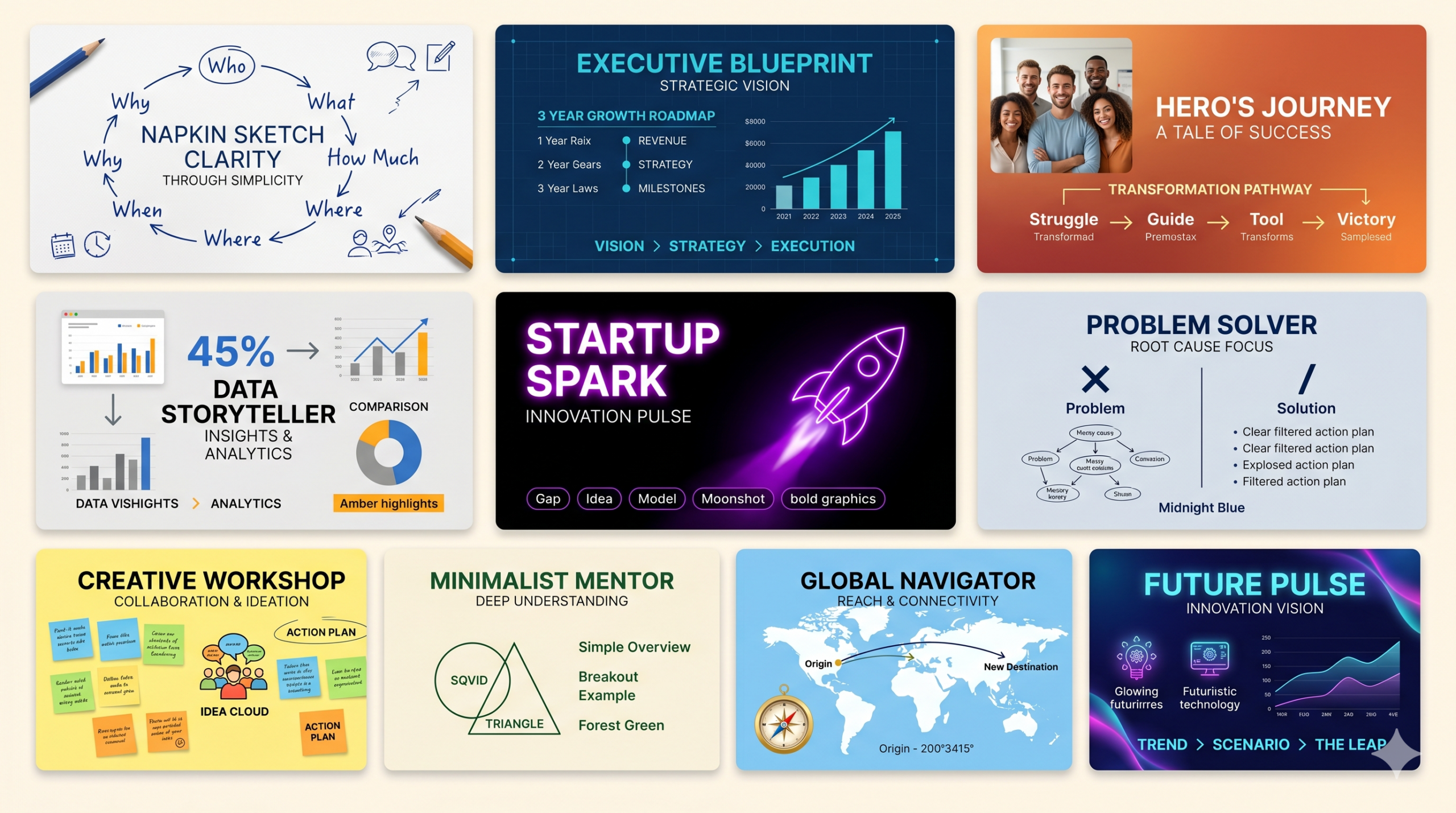
ชุดคำสั่ง (Prompt) ที่ทรงพลังที่สุดสำหรับการสร้างสไลด์ผ่าน NotebookLM โดยเน้นย้ำหลักการ “The Pop Up Pitch” ของ Dan Roam ที่เน้นความเรียบง่าย แต่ทรงพลังด้วยภาพและการเล่าเรื่องแบบ Storytelling นี่คือ 10 ชุดคำสั่ง YAML Prompt ที่ออกแบบมาเพื่อเปลี่ยนเนื้อหาของคุณให้กลายเป็นงานนำเสนอระดับมืออาชีพครับ
เลือกหัวข้ออ่าน
Toggle1. Prompt: The Napkin Sketch Clarity
คำแนะนำการใช้งาน: เน้นความเรียบง่ายสูงสุดเหมือนการวาดลงบนกระดาษทิชชู่ (Napkin) ตามแก่นแท้ของ Dan Roam เหมาะสำหรับหัวข้อที่ซับซ้อนแต่ต้องการอธิบายให้เข้าใจง่ายภายในเวลาสั้นๆ เน้นใช้ภาพลายเส้นหรือ Icon ที่ดูเป็นกันเอง
presentation_design_system:
  metadata:
    theme: "The Napkin Sketch Clarity"
    core_concept: "Simplicity is the Ultimate Sophistication (ความเรียบง่ายคือความลุ่มลึกขั้นสุด)"

  content_strategy:
    target_topic: "[ระบุหัวข้อของคุณ]"
    presentation_flow: "[Who & What > How Much > Where > When > How > Why]"
    tone_of_voice: "Casual, Direct & Clarifying (เป็นกันเอง ตรงไปตรงมา และสร้างความชัดเจน)"

  visual_identity:
    color_system:
      primary_background:
        name: "Paper White"
        hex: "#FFFFFF"
        application: "พื้นหลังสะอาดตาเหมือนกระดาษวาดเขียน"
      primary_accent:
        name: "Ink Blue"
        hex: "#1A237E"
        application: "ใช้สำหรับลายเส้นกราฟิกและหัวข้อหลัก เหมือนเขียนด้วยปากกาหมึกซึม"
      primary_text:
        name: "Graphite Gray"
        hex: "#424242"
        application: "เนื้อหาหลัก อ่านง่ายและดูสบายตา"

    typography:
      font_family: "Handwritten style for titles (เช่น Kalam) และ Sans-serif สำหรับเนื้อหา (เช่น Open Sans)"
      heading_weight: "Bold"
      body_weight: "Regular"

  layout_guidelines:
    grid_system: "Hand-drawn Grid (การจัดวางที่ดูไม่เป๊ะจนเกินไป เพื่อความรู้สึกเข้าถึงง่าย)"
    visual_hierarchy:
      - "ใช้ Icon ลายเส้นแบบ Minimalist แทนรูปภาพจริง"
      - "เน้นการใช้ลูกศร (Arrows) เพื่อบอกทิศทางของความคิด"
    decorative_elements:
      shapes: "Rough Circles & Hand-drawn Boxes"

  slide_templates:
    master_cover:
      background_style: "Solid White พร้อมลายเส้นวงกลมที่ล้อมรอบชื่อเรื่อง"
      title_alignment: "Center"
      title_color: "Ink Blue (#1A237E)"
2. Prompt: The Executive Blueprint
คำแนะนำการใช้งาน: เหมาะสำหรับการนำเสนอแผนกลยุทธ์หรือโครงสร้างธุรกิจที่ต้องการความน่าเชื่อถือสูง แต่ยังคงความเรียบง่ายแบบ Pop Up Pitch เน้นการแสดงโครงสร้าง (The Map) ให้ชัดเจนเพื่อให้ผู้บริหารตัดสินใจได้ทันที
presentation_design_system:
  metadata:
    theme: "The Executive Blueprint"
    core_concept: "Structural Vision (วิสัยทัศน์ที่มองเห็นโครงสร้างชัดเจน)"

  content_strategy:
    target_topic: "[ระบุหัวข้อของคุณ]"
    presentation_flow: "[The Sky (Vision) > The Road (Strategy) > The Ground (Execution)]"
    tone_of_voice: "Authoritative & Confident (มีอำนาจ เชื่อมั่น และเด็ดขาด)"

  visual_identity:
    color_system:
      primary_background:
        name: "Blueprint Navy"
        hex: "#0D1B2A"
        application: "พื้นหลังสีน้ำเงินเข้มขรึม สร้างความหนักแน่น"
      primary_accent:
        name: "Electric Cyan"
        hex: "#00E5FF"
        application: "ใช้เน้นเส้น Roadmap และจุด Milestone สำคัญ"
      primary_text:
        name: "Pure White"
        hex: "#FFFFFF"
        application: "ข้อความสีขาวตัดกับพื้นหลังเพื่อให้โดดเด่น"

    typography:
      font_family: "Modern Sans-serif (เช่น Roboto หรือ Helvetica)"
      heading_weight: "Extra Bold"
      body_weight: "Light"

  layout_guidelines:
    grid_system: "Strict Modular Grid (การจัดวางที่เป็นระเบียบ แม่นยำ)"
    visual_hierarchy:
      - "ใช้เส้นประและจุดเชื่อมโยงเพื่อแสดงความสัมพันธ์ของข้อมูล"
      - "เน้นตัวเลข (Data Visual) ขนาดใหญ่ในจุดที่ต้องการเน้น"

  slide_templates:
    master_cover:
      background_style: "Navy Blue พร้อมเส้น Grid บางๆ แบบวิศวกรรม"
      title_alignment: "Left-Aligned"
      title_color: "Electric Cyan (#00E5FF)"
3. Prompt: The Hero’s Journey (Story-Driven)
คำแนะนำการใช้งาน: ใช้สำหรับการ Pitch ไอเดียใหม่ๆ หรือโปรเจกต์ที่ต้องการแรงบันดาลใจ โดยเปลี่ยน “ลูกค้า” หรือ “ผู้ใช้” ให้เป็นฮีโร่ เดินตามหลักการเล่าเรื่องของ Dan Roam ที่สร้างอารมณ์ร่วม
presentation_design_system:
  metadata:
    theme: "The Hero's Journey"
    core_concept: "Transformation & Success (การเปลี่ยนแปลงและการประสบความสำเร็จ)"

  content_strategy:
    target_topic: "[ระบุหัวข้อของคุณ]"
    presentation_flow: "[The Struggle > The Guide > The Tool > The Victory]"
    tone_of_voice: "Narrative & Inspiring (การเล่าเรื่องและสร้างแรงบันดาลใจ)"

  visual_identity:
    color_system:
      primary_background:
        name: "Sunset Ember"
        hex: "#FFF5F2"
        application: "พื้นหลังโทนอุ่นให้ความรู้สึกมีความหวัง"
      primary_accent:
        name: "Action Orange"
        hex: "#FF5722"
        application: "ใช้สำหรับปุ่ม Call to Action หรือจุดเปลี่ยนของเรื่อง"
      primary_text:
        name: "Deep Mahogany"
        hex: "#3E2723"
        application: "ข้อความเนื้อหาหลักดูนุ่มนวลแต่จริงจัง"

    typography:
      font_family: "Serif for storytelling (เช่น Georgia) และ Sans-serif สำหรับข้อเท็จจริง"
      heading_weight: "Bold Italic"
      body_weight: "Regular"

  layout_guidelines:
    grid_system: "Cinematic Aspect (จัดวางเหมือนเฟรมภาพยนตร์)"
    visual_hierarchy:
      - "ใช้ภาพถ่ายคนที่มีอารมณ์ความรู้สึกชัดเจน"
      - "เว้นที่ว่างให้มาก (White Space) เพื่อโฟกัสที่เนื้อเรื่องเดียวต่อหนึ่งสไลด์"

  slide_templates:
    master_cover:
      background_style: "ไล่เฉดสีอ่อนๆ จากส้มไปขาว"
      title_alignment: "Bottom-Left"
      title_color: "Action Orange (#FF5722)"
4. Prompt: The Data Storyteller (Visual Analytics)
คำแนะนำการใช้งาน: เหมาะสำหรับการนำเสนอตัวเลขหรืองานวิจัย โดยใช้หลัก “How Much” และ “Where” ของ Dan Roam เปลี่ยนตัวเลขแห้งๆ ให้เป็นภาพที่สื่อสารความหมาย
presentation_design_system:
  metadata:
    theme: "The Data Storyteller"
    core_concept: "Insight through Sight (การสร้างความเข้าใจผ่านการเห็น)"

  content_strategy:
    target_topic: "[ระบุหัวข้อของคุณ]"
    presentation_flow: "[Context > Comparison > The Peak Point > Conclusion]"
    tone_of_voice: "Analytical & Objective (เชิงวิเคราะห์ และเป็นกลาง)"

  visual_identity:
    color_system:
      primary_background:
        name: "Neutral Gray"
        hex: "#F8F9FA"
        application: "พื้นหลังสีเทาอ่อนเพื่อให้สีของกราฟโดดเด่น"
      primary_accent:
        name: "Primary Blue"
        hex: "#1976D2"
        application: "ใช้สำหรับกราฟและข้อมูลที่สำคัญที่สุด"
      secondary_accent:
        name: "Alert Amber"
        hex: "#FFC107"
        application: "ใช้เน้นจุดที่ผิดปกติหรือจุดที่ต้องระวังในข้อมูล"

    typography:
      font_family: "Monospace สำหรับตัวเลข (เช่น JetBrains Mono) และ Sans-serif สำหรับข้อความ"
      heading_weight: "Bold"
      body_weight: "Medium"

  layout_guidelines:
    grid_system: "Split Screen (แบ่งครึ่งสไลด์: ฝั่งหนึ่งรูป/กราฟ ฝั่งหนึ่งคำอธิบาย)"
    visual_hierarchy:
      - "ใช้แผนภูมิวงกลมหรือกราฟแท่งที่ตัดทอนรายละเอียดที่ไม่จำเป็นออก"
      - "เน้น 'ตัวเลขเดียว' ที่เป็นใจความสำคัญกลางหน้ากระดาษ"

  slide_templates:
    master_cover:
      background_style: "เทาอ่อน พร้อมไอคอนกราฟเส้นจางๆ"
      title_alignment: "Center"
      title_color: "Primary Blue (#1976D2)"
5. Prompt: The Startup Spark (High Energy)
คำแนะนำการใช้งาน: สำหรับการ Pitch สตาร์ทอัพที่ต้องการความเร็ว แรง และนวัตกรรม เน้นความกระชับฉับไวแบบ Pop Up ที่เห็นแล้ว “ว้าว” ทันที
presentation_design_system:
  metadata:
    theme: "The Startup Spark"
    core_concept: "Disruption & Momentum (การเปลี่ยนแปลงอย่างรวดเร็วและพลังขับเคลื่อน)"

  content_strategy:
    target_topic: "[ระบุหัวข้อของคุณ]"
    presentation_flow: "[The Gap > The Spark (Idea) > The Engine (Model) > The Moonshot]"
    tone_of_voice: "Energetic & Bold (กระตือรือร้นและกล้าหาญ)"

  visual_identity:
    color_system:
      primary_background:
        name: "Pitch Black"
        hex: "#121212"
        application: "พื้นหลังดำสนิทเพื่อความ Modern และ Premium"
      primary_accent:
        name: "Neon Purple"
        hex: "#BB86FC"
        application: "สีม่วงนีออนสื่อถึงนวัตกรรมและอนาคต"
      primary_text:
        name: "Soft Silver"
        hex: "#E0E0E0"
        application: "ตัวอักษรสีเงินอ่านง่ายบนพื้นดำ"

    typography:
      font_family: "Geometric Sans-serif (เช่น Futura หรือ Poppins)"
      heading_weight: "Black (หนาพิเศษ)"
      body_weight: "Regular"

  layout_guidelines:
    grid_system: "Dynamic Diagonal (การจัดวางแนวทแยงเพื่อให้รู้สึกถึงความเคลื่อนไหว)"
    visual_hierarchy:
      - "ใช้ภาพ Abstract หรือเทคโนโลยีล้ำสมัย"
      - "คำโปรย (Tagline) ต้องใหญ่และสั้น"

  slide_templates:
    master_cover:
      background_style: "Black พื้นผิว Metallic เล็กน้อย"
      title_alignment: "Center"
      title_color: "Neon Purple (#BB86FC)"
6. Prompt: The Problem Solver (Root Cause Focus)
คำแนะนำการใช้งาน: เน้นการวิเคราะห์ปัญหาและทางออก (The Forest) เหมาะสำหรับงานที่ต้องแก้ Pain Point โดยเฉพาะ ช่วยให้ผู้ฟังเห็นว่าเราเข้าใจปัญหาอย่างลึกซึ้ง
presentation_design_system:
  metadata:
    theme: "The Problem Solver"
    core_concept: "Clarity from Chaos (ความชัดเจนจากความวุ่นวาย)"

  content_strategy:
    target_topic: "[ระบุหัวข้อของคุณ]"
    presentation_flow: "[The Mess (Problem) > Root Cause > The Filter > The Solution]"
    tone_of_voice: "Empathetic & Logical (เห็นอกเห็นใจและมีเหตุผล)"

  visual_identity:
    color_system:
      primary_background:
        name: "Clean Slate"
        hex: "#EDF2F4"
        application: "พื้นหลังสีเทาอมฟ้า ดูสะอาดและเป็นระเบียบ"
      primary_accent:
        name: "Safety Red"
        hex: "#D90429"
        application: "ใช้แสดงส่วนที่เป็นปัญหาหรือจุดวิกฤต"
      primary_text:
        name: "Midnight Blue"
        hex: "#2B2D42"
        application: "ตัวอักษรสีน้ำเงินเข้มขรึม"

    typography:
      font_family: "Condensed Sans-serif เพื่อความกระชับ"
      heading_weight: "Extra Bold"
      body_weight: "Regular"

  layout_guidelines:
    grid_system: "Comparison Layout (เปรียบเทียบ Before vs After)"
    visual_hierarchy:
      - "ใช้เครื่องหมายกากบาท (X) และเครื่องหมายถูก (/) เป็นสัญลักษณ์นำทาง"
      - "เน้นการทำ Step-by-Step process"

  slide_templates:
    master_cover:
      background_style: "Solid Gray พร้อมกราฟิกเข็มทิศ"
      title_alignment: "Left"
      title_color: "Midnight Blue (#2B2D42)"
7. Prompt: The Creative Workshop (Interactive Feel)
คำแนะนำการใช้งาน: ออกแบบมาเพื่อให้ความรู้สึกเหมือนการระดมสมอง (Brainstorming) เหมาะสำหรับการนำเสนอที่ต้องการให้ผู้ฟังมีส่วนร่วม หรือการสรุป Workshop
presentation_design_system:
  metadata:
    theme: "The Creative Workshop"
    core_concept: "Collaboration & Ideation (การร่วมมือและการสร้างสรรค์ไอเดีย)"

  content_strategy:
    target_topic: "[ระบุหัวข้อของคุณ]"
    presentation_flow: "[The Question > The Idea Cloud > The Selection > The Action Plan]"
    tone_of_voice: "Playful & Encouraging (สนุกสนานและให้กำลังใจ)"

  visual_identity:
    color_system:
      primary_background:
        name: "Sticky Note Yellow"
        hex: "#FFF9C4"
        application: "พื้นหลังสีเหลืองอ่อนเหมือนกระดาษโพสต์อิท"
      primary_accent:
        name: "Marker Teal"
        hex: "#009688"
        application: "ใช้เน้นข้อความเหมือนใช้ปากกาไฮไลท์"
      primary_text:
        name: "Ink Black"
        hex: "#212121"
        application: "ข้อความชัดเจนเหมือนเขียนด้วยปากกามาร์กเกอร์"

    typography:
      font_family: "Rounded Sans-serif (เช่น Quicksand)"
      heading_weight: "Bold"
      body_weight: "Medium"

  layout_guidelines:
    grid_system: "Mosaic (จัดวางเหมือนการแปะโน้ตบนบอร์ด)"
    visual_hierarchy:
      - "ใช้รูปทรงอิสระ (Blobs) และกรอบคำพูด (Speech Bubbles)"
      - "มีพื้นที่ว่างสำหรับให้คนจดบันทึกตามได้"

  slide_templates:
    master_cover:
      background_style: "Yellow ลายตารางจางๆ (Dotted Paper)"
      title_alignment: "Center"
      title_color: "Marker Teal (#009688)"
8. Prompt: The Minimalist Mentor (Educational)
คำแนะนำการใช้งาน: สำหรับการสอนหรือการอธิบายความรู้เบื้องต้น เน้นหลัก “SQVID” ของ Dan Roam เพื่อมองภาพจากหลายมุมมองในหน้าเดียว
presentation_design_system:
  metadata:
    theme: "The Minimalist Mentor"
    core_concept: "Deep Understanding (ความเข้าใจอย่างลึกซึ้ง)"

  content_strategy:
    target_topic: "[ระบุหัวข้อของคุณ]"
    presentation_flow: "[Simple Overview > Detailed Breakout > Practical Example > Summary]"
    tone_of_voice: "Patient & Clear (อดทนและชัดเจน)"

  visual_identity:
    color_system:
      primary_background:
        name: "Soft Cream"
        hex: "#FEFAE0"
        application: "พื้นหลังสีครีม ถนอมสายตาสำหรับการอ่านนานๆ"
      primary_accent:
        name: "Forest Green"
        hex: "#606C38"
        application: "สีเขียวเข้มเพื่อความสงบและมั่นคง"
      primary_text:
        name: "Earth Brown"
        hex: "#283618"
        application: "ข้อความโทนสีธรรมชาติ"

    typography:
      font_family: "Classic Serif for body (เช่น Lora) และ Sans for headings"
      heading_weight: "Bold"
      body_weight: "Regular"

  layout_guidelines:
    grid_system: "Focus Point (เน้นจุดกึ่งกลางของสไลด์)"
    visual_hierarchy:
      - "ใช้ Diagram วงกลมหรือสามเหลี่ยมเพื่ออธิบายความสัมพันธ์"
      - "ใช้คำศัพท์น้อยที่สุด แต่ทรงพลังที่สุด"

  slide_templates:
    master_cover:
      background_style: "ครีมล้วน เรียบง่ายที่สุด"
      title_alignment: "Center"
      title_color: "Forest Green (#606C38)"
9. Prompt: The Global Navigator (Logistics/Expansion)
คำแนะนำการใช้งาน: เหมาะสำหรับการนำเสนอเรื่องการขยายธุรกิจ หรือแผนการเดินทางของโปรเจกต์ เน้นหลักการ “Where” และ “When” ของ Dan Roam
presentation_design_system:
  metadata:
    theme: "The Global Navigator"
    core_concept: "Reach & Connectivity (การเข้าถึงและการเชื่อมต่อ)"

  content_strategy:
    target_topic: "[ระบุหัวข้อของคุณ]"
    presentation_flow: "[Origin > The Route > Expansion > The Destination]"
    tone_of_voice: "Global & Strategic (ระดับสากลและเป็นกลยุทธ์)"

  visual_identity:
    color_system:
      primary_background:
        name: "Sky Blue"
        hex: "#E1F5FE"
        application: "พื้นหลังสีฟ้าสว่าง สื่อถึงพื้นที่กว้างกวาง"
      primary_accent:
        name: "Compass Gold"
        hex: "#FFD600"
        application: "ใช้เน้นจุดหมายปลายทางหรือเป้าหมาย"
      primary_text:
        name: "Navy Depth"
        hex: "#01579B"
        application: "ข้อความสีน้ำเงินเข้มมืออาชีพ"

    typography:
      font_family: "Strong Sans-serif (เช่น Montserrat)"
      heading_weight: "Bold"
      body_weight: "Regular"

  layout_guidelines:
    grid_system: "Map-based (จัดวางเหมือนแผนที่ หรือ Timeline)"
    visual_hierarchy:
      - "ใช้เส้นเชื่อมโยงจากจุด A ไปจุด B"
      - "ใส่ภาพแผนที่หรือพิกัดประกอบ"

  slide_templates:
    master_cover:
      background_style: "Sky Blue พร้อมเส้นละติจูดลองจิจูดจางๆ"
      title_alignment: "Left"
      title_color: "Navy Depth (#01579B)"
10. Prompt: The Future Pulse (Innovation & Tech)
คำแนะนำการใช้งาน: สำหรับการคาดการณ์แนวโน้มในอนาคต (The Sky) เน้นการแสดงภาพความฝันที่จับต้องได้ด้วยการสรุปใจความสำคัญ
presentation_design_system:
  metadata:
    theme: "The Future Pulse"
    core_concept: "Anticipation & Vision (การคาดการณ์และวิสัยทัศน์)"

  content_strategy:
    target_topic: "[ระบุหัวข้อของคุณ]"
    presentation_flow: "[Today's Reality > The Emerging Trend > Future Scenario > The Leap]"
    tone_of_voice: "Visionary & Optimistic (มองการณ์ไกลและมองโลกในแง่ดี)"

  visual_identity:
    color_system:
      primary_background:
        name: "Deep Space"
        hex: "#1A1A2E"
        application: "พื้นหลังสีน้ำเงินอวกาศ"
      primary_accent:
        name: "Cyber Pink"
        hex: "#E94560"
        application: "สีชมพูเข้มเพื่อความโดดเด่นและตื่นเต้น"
      primary_text:
        name: "Cloud White"
        hex: "#F9F9F9"
        application: "ข้อความสะอาดตา"

    typography:
      font_family: "Wide Sans-serif (เช่น Orbitron) และ Sans-serif ปกติ"
      heading_weight: "Semi-Bold"
      body_weight: "Light"

  layout_guidelines:
    grid_system: "Asymmetrical & Fluid (จัดวางแบบลื่นไหล ไม่ยึดติดกรอบ)"
    visual_hierarchy:
      - "ใช้องค์ประกอบเรืองแสง (Glow effects) ในจุดสำคัญ"
      - "เน้นการใช้กราฟิกแบบ Gradient"

  slide_templates:
    master_cover:
      background_style: "Deep Space พร้อมแสงรัศมี (Glow) ที่ขอบ"
      title_alignment: "Center"
      title_color: "Cyber Pink (#E94560)"